




On July 7, PriceLabs announced three product launches in one go: a mobile app, an MCP connector that plugs the tool into Claude, Anthropic’s AI assistant, and an upgraded Customer API. RSU is an industry voice that is part of PriceLabs, so I followed this launch from the inside — and I tested it myself before writing about it.
For months, we at RSU have been working to understand and explain what AI means for vacation rental managers: in AI in Vacation Rentals: Build Your Own or Wait for Your PMS?, in our guide to AI agents for property managers, in our AI-readiness checklist for vacation rental websites, and in our webinars.
In those pieces, MCP — the standard plug that connects an AI assistant to your business tools — was still mostly theory: a promising model we called “your software comes to your AI.” This launch turns that theory into something concrete that you can try on your own listings this week. Here’s the thing: the point is bigger than asking your pricing tool questions in a chat window. An MCP connector lets a business user find, analyze, and change things — and build with them: the custom dashboard, the beautiful owner report, the scheduled Monday briefing. Until now, that kind of work meant a developer with API access, or a request sitting in your BI team’s queue (if you are lucky enough to have one). Now it is a sentence you type — and that is why this launch is worth your attention, whatever pricing tool you use. One precision before we go further: at launch, the connector works with Claude only, not (yet) with ChatGPT or Gemini.
Key takeaways:

- PriceLabs launched three access points on July 7: a mobile app (iOS and Android, 7 languages), an MCP connector for Claude (Claude only, for now), and 10+ new endpoints on its Customer API. All three run on the same pricing engine and dataset as the dashboard.
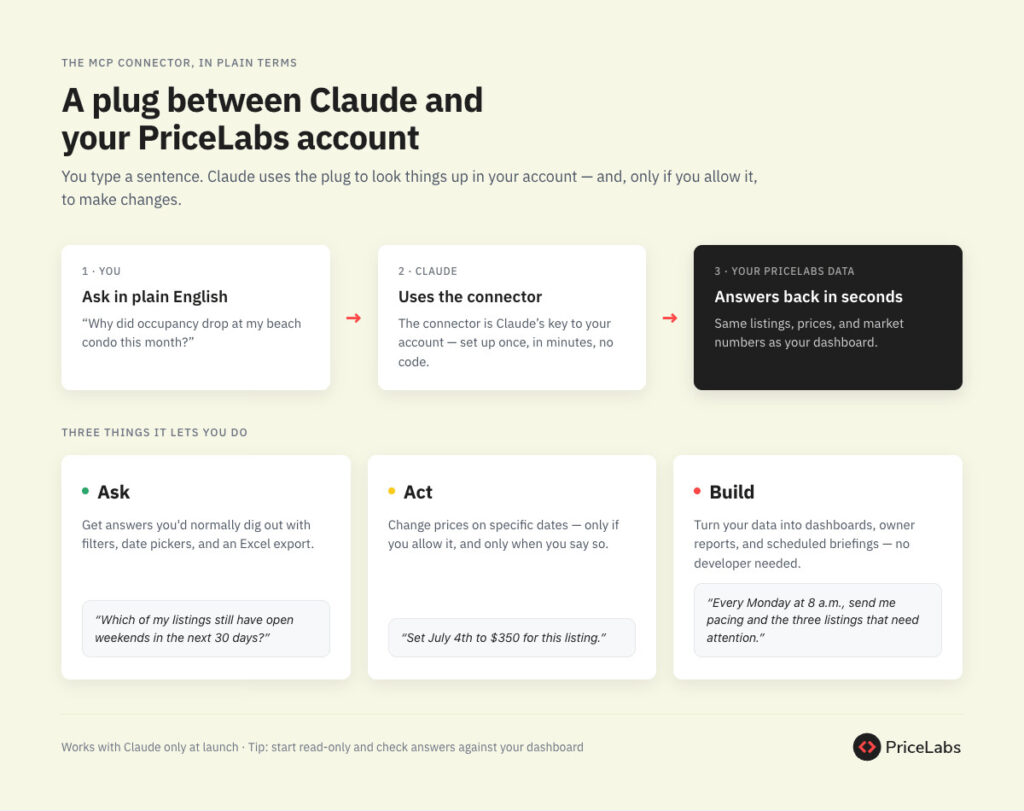
- The MCP connector comes out of a 2-month beta and handles both questions (“Why did occupancy drop at my beach condo this month?”) and actions (“Set July 4th to $350 for this listing”). It hands business users what used to require a developer and an API, or a BI team: the power to query, change, and build on their own pricing data.
- PriceLabs’ API is already used by more than 4,000 customers — but the API takes a developer. The MCP connector hands that kind of access to business users, in plain English, no code.
- I connected the MCP to Claude on my own PriceLabs account — I manage my own rentals, and as a PriceLabs employee I had early access — and checked what it can actually do: answer plain-language portfolio questions in seconds, change prices on specific dates, and feed reports, dashboards, and scheduled briefings you build in Claude itself, no code involved.
In this article, we’ll look at what PriceLabs actually launched, and then spend most of our time on the MCP connector: what a Claude user can ask, change, and build with it, with concrete scenarios — and what it means for how you evaluate every tool in your stack from now on.
One engine, three doors — and one door that matters most here
All three launches open onto the same pricing engine and dataset that power the PriceLabs dashboard. The mobile app (iOS and Android, in 7 languages) is the door that needs no explaining: your prices, your performance, your adjustments, from your phone. The upgraded Customer API is the developers’ door, and it carries one number worth pausing on: more than 4,000 customers already use it to build dashboards, automated workflows, and custom applications. So the demand for deeper access to pricing data is real and proven. But every one of those 4,000 needed a developer to get anything out of it.
The MCP connector is the third door, and the reason this article exists: it is the API’s power without the developer. MCP, or Model Context Protocol, is the connection standard we described in our Build-or-Wait article: a standard plug that lets an AI assistant talk to your business tools with no code involved. The simplest way to picture it: Claude is a sharp new team member who, until today, had no login to any of your systems. The MCP connector hands that team member the keys to your PriceLabs account. From that moment, they can look things up for you and, if you allow it, make changes — in plain English, at any hour. At launch, it works with Claude only; ChatGPT and Gemini are not supported yet.
Here’s what PriceLabs co-founder Richie Khandelwal said: “We started with the vision of making highly analytical tools available to all. By expanding PriceLabs’ capabilities into the places users are really working, we’re continuing to serve that vision.” The strategic read: the pricing engine and the data are the product; the dashboard, the phone, the AI assistant, and the API are just doors into it. We expect other vendors (PMS platforms first) to copy this framing within months — speculation on our part, but the direction of travel seems clear.
What you would actually use it for: ask, act, build
Reading a press release is one thing. So I connected the PriceLabs MCP to Claude myself. I am in a good position to test this one: I manage my own vacation rental properties, I price them with PriceLabs like any customer — and, as a PriceLabs employee, I had early access to the connector.
The setup itself is the easy part: a few minutes in Claude’s connector settings, no code. Once connected, here is what the connector hands over: your listings, daily price recommendations, occupancy and ADR figures compared to your market, booking reports down to each reservation, and the ability to change the price of specific dates. I exercised the reading side myself — portfolio, performance, and booking data pulled straight from my own account. The price-change tools are there too; I deliberately left them untouched, for reasons I’ll come back to. Every scenario below maps to a capability the connector actually exposes.
Ask: your data answers back in plain language
The entry point is the question you would normally translate into filters, date pickers, and an Excel export. Instead, you ask the way you would ask a colleague:
- “How is this villa performing — occupancy and ADR for the next 60 days versus the market?”
- “Why did occupancy drop at my beach condo this month?”
- “Which of my listings still have open weekends in the next 30 days, and how are they doing against the market?”
I asked the first question about one of my own villas. The answer came back in seconds: occupancy on the books for the next 60 days at 97%, against 22% for the market, with an ADR of $3,105 versus $4,026 at the same time last year — about 23% lower. The follow-up question writes itself: nearly sold out at a rate well below last year’s — is it underpriced? One caveat from the same session: listings of mine that were not fully synced with PriceLabs returned blanks or a plain “sync is not toggled on” message rather than invented numbers. That is the right behavior, and a reminder that the AI is only as good as the data pipeline behind it. So, there you go: fast, honest answers on synced listings, silence on unsynced ones.
Act: change prices from the chat window
The connector does not only read. “Set July 4th to $350 for this listing” is an instruction, not a question: the connector ships the tools to change the price of specific dates and refresh a listing’s pricing. Picture spotting a gap weekend from your phone on a Saturday night and closing it in one sentence. Useful — and exactly why I kept my own test read-only, and why I suggest you do the same at first, deciding early who on your team is allowed to give that kind of order.
Build: this is the part that changes your workflow
This is the part most coverage of MCP misses, and the reason a business user — not a developer — should care. Once PriceLabs data flows into Claude, everything Claude can do applies to that data. You are not limited to a chat transcript. The dashboard you used to request from your BI team, the polished owner report a developer would have built against the API: without writing a line of code, you can ask Claude to:
- Build a portfolio dashboard as a live web page: occupancy pacing versus the market per listing, weekends still open, the listings lagging their market — and refresh it on demand.
- Produce an owner report: for the owner who calls on the first of every month, pull that property’s numbers, write the monthly summary in your brand’s tone (or in French, if that is what the owner prefers), and format it as a PDF or Word document ready to send.
- Schedule a Monday-morning briefing: Claude can run tasks on a schedule, so your 8 a.m. Monday message — pacing, pickup since last week, the three listings that need attention — is waiting for you before your first coffee.
- Cross-reference: combine PriceLabs market data with your own files (“here is my owner contract — given these occupancy numbers, are we on track for the guaranteed revenue clause?”).
I checked the plumbing behind each of these against the tools the connector actually exposes during my test session. This combination — your pricing engine’s data plus a general-purpose AI’s ability to write documents, build pages, and run scheduled tasks — is what “your software comes to your AI” means in practice. The dashboard shows you what PriceLabs decided to show you. The connector lets you build the view you actually need.
What it means for property managers
Two weeks ago, in Build-or-Wait, we told you the real question was not “should I build my own AI?” but “will my vendors ship affordable connectors, and how do I evaluate them when they do?” Now that a live example exists, that evaluation is no longer hypothetical. Here is what I suggest you do:
- Ask every vendor in your stack the connector question. Do you have an MCP connector or an equivalent? Is it included in my plan? If the answer is “on the roadmap,” ask for a date. As we showed in Build-or-Wait, know-how (54%) and time (37%), not cost (5%), are what block AI adoption; an official connector attacks both barriers at once.
- Start read-only. Generate your MCP credentials from the Settings tab of your PriceLabs account (the PriceLabs MCP page walks you through it), connect it in Claude, ask performance and market questions, and check the answers against the dashboard for two or three weeks before anyone sends a write command.
- Write down who is allowed to change prices via chat. A junior teammate with a Claude login and a connected PriceLabs account can reprice your whole portfolio in a sentence. Decide now whether that requires a second pair of eyes, and put it in your SOPs.
Conclusion
So, does one launch prove that “your software comes to your AI” is the future of vacation rental tech? Well, one vendor is not a trend. But the reason I spent the past weeks writing about AI agents and MCP was that I believed managers would soon face exactly this kind of product and would need to know how to judge it — starting with the one built in our own house.
That moment is here. Instead of a chatbot widget in a corner of a dashboard, this is the plumbing that pulls a pricing engine into Claude today — with support for more AI assistants coming, per PriceLabs — where you can not only ask, but build: reports, dashboards, scheduled briefings, in your own words and your own format. Now, as usual, what matters is your own operation: connect it, test it on your own listings, check the answers against your own data, and decide who in your company gets to talk to your pricing tool.

Thibault Masson is a leading expert in vacation rental revenue management and dynamic pricing strategies. As Head of Product Marketing at PriceLabs and founder of Rental Scale-Up, Thibault empowers hosts and property managers with actionable insights and data-driven solutions. With over a decade managing luxury rentals in Bali and St. Barths, he is a sought-after industry speaker and prolific content creator, making complex topics simple for global audiences.